What this is
Sixty seconds, so nothing later is a surprise.
Jericho Mini watches the CCTV cameras you already own and tells you — on WhatsApp, with the photo — when a person is on your property. Not a car going past, not a branch, not rain. A person, inside an area you chose.
Everything that looks at your video runs on a small box on your premises. Nothing streams to us. When the box sees a person in your watched area it sends out one still image and a short line of text. That is the only thing that ever leaves.
If you don't answer that message, it phones you. If you still don't answer, it phones the next person on your list.
What it is not
It is not an armed response company. Nobody is dispatched to your property and we do not contact the police for you. It is not a guarantee — it runs on your cameras, your power and your internet, none of which we control. And it is not a video recorder: we keep still photos of real detections for the number of days in your plan, and nothing else.
What an alert looks like
This is the whole product. Everything else is a setting.
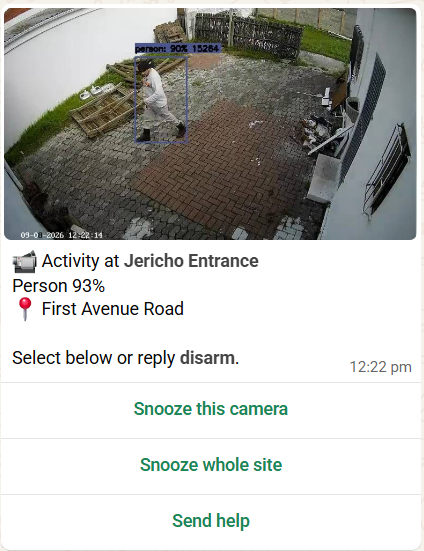
It arrives within seconds of the person being seen. The photo is the moment of detection, the line under it is which camera and where, and Person 93% is how confident the AI was.
The three buttons
- Snooze this camera
- Stops that one camera alerting for a while. Use it when you know why it is going off — you are working in the yard, or the dog walker is due.
- Snooze whole site
- Stops everything for a while. Use it when you have people over.
- Send help
- Rings your emergency contacts and sends them your address. See “Send help” below before you use it.
You do not have to press anything. React with 👍, or reply OK — either tells it you have seen the alert, and that alone stops it phoning you. The alert stays in your list so you can look back at it; reply ALL CLEAR when you want it closed.
If you don’t answer
The part that matters at three in the morning.
An alert that lights up a phone lying face-down on a bedside table has done nothing. So it escalates — deliberately slowly, one person at a time, and it stops the instant somebody responds.
Anyone answering anywhere stops the whole chain. Nobody further down gets woken for an event that has already been dealt with.
Talking to it
There is no app. It is the same WhatsApp chat the alerts come from.
Type any of these into the chat. Case does not matter.
| Send this | What happens |
|---|---|
| ARM | Every camera live. With more than one property this arms all of them. |
| DISARM | Stops monitoring. With more than one property it will ask which — it will not guess and leave a property unwatched. |
| HOME | You are home. Alerts still come, the phone stops ringing. Indoor cameras stand down; the perimeter keeps watching. |
| ARM HOME | Name the property to be exact — the short name you chose, e.g. arm office. |
| I'M HOME | Plain English works. Puts the property in home mode without you having to remember a command. BACK HOME, JUST GOT HOME and ARRIVED do the same. |
| GOING TO BED | Arms everything for the night. GOODNIGHT, LOCKING UP and LEAVING all arm too. |
| STATUS | What is armed right now, and when it last saw anything. |
| SNOOZE | Quiet a camera, or the whole property, for a set time. It says which camera and what time it starts watching again — and it starts watching again by itself. |
| WATCH | Undo any snooze — the cameras start watching again immediately. Also re-arms a property you had snoozed. RESUME and WAKE UP do the same. |
| WHY | The one to remember. “It saw something and did not tell me — why?” Lists everything held back in the last six hours and the reason for each, in plain words. |
| DASHBOARD | A private link to your own panel. It expires — ask again whenever you need one. |
| MENU | The buttons, if you would rather tap than type. |
| 👍 | React to an alert with a thumbs-up — the fastest way to stop the calls. Long-press the message. |
| OK | Same thing typed. SEEN, ON IT, GOT IT, NOTED and THANKS all work too. |
| ALL CLEAR | It was nothing — stops the calls AND closes the alert. |
Raising protection is instant; lowering it is aimed. "Going to bed" arms every property at once, but "I'm home" puts one property in home mode and asks which if you have more than one — and it never disarms you, because turning the whole alarm off takes the gate and the driveway with it. ARM on its own arms everything, but DISARM on its own asks you which. That asymmetry is on purpose: arming too much is fixed in one message, while a property you believed was armed and wasn't is not fixable at all.
Armed, home, disarmed
Three states. The middle one is the one people underuse.
- 🔴 Armed
- Every enabled camera is watching. This is the normal state overnight and whenever the property is empty.
- 🟡 Home
- You are there. It tells you, it does not phone you. The WhatsApp alert still arrives — same picture, same second — but the phone stays silent, because you are standing in the house. On top of that, cameras set as indoor cameras stand down entirely while the perimeter and the driveway keep watching, so moving around your own home does not set it off.
- 🟢 Disarmed
- Nothing is being watched. You are told plainly, every time, because a customer who thinks they are armed and isn’t is the worst state this system has.
Which cameras stand down in home mode is set up for you — at installation, or any time by replying SUPPORT. It is a one-off decision about your own layout, not something you should have to think about at the door. Until that is set, home mode watches everything — the same as armed. The bedtime reminder. People disarm when they get home and forget to arm at night, which is the exact window this exists for. If you ask us to, we will send one message at a time you choose — "arming for the night?" — with buttons. It is only sent if the property is not already armed, once an evening, and *🔕 Stop asking* ends it for good.
Your panel
Send DASHBOARD on WhatsApp to get a link.
The link works for a few minutes and then expires. That is deliberate — an old link sitting in your chat history should never be a key to your alarm.
What you can do there
- Arm and disarm
- The same three states, with buttons.
- See your cameras
- What is enabled, what is snoozed, what each one is set to detect.
- Look back at alerts
- Recent detections with their photos, for the number of days your plan keeps.
- Change who gets alerted
- Add or reorder the people in your chain, and your emergency contacts.
“Send help”
Read this before you need it.
Pressing Send help calls the emergency contacts you nominated and sends them your address. It does that immediately, and it does not stop until it has worked through them.
Be clear about who that reaches
It reaches the people on your own list — a neighbour, a family member, your security company if you have one and gave us their number. It does not contact the police, and it does not send a response vehicle. If you are in danger, phone 10111 or your armed response company directly. Send help is for getting the people who already know your property moving.
Using it is never charged and never limited, however often you need it. Only the length of the chain is capped, by your plan.
Why it sometimes goes quiet
On purpose, and it will tell you — send WHY at any time.
Send WHY. Nothing in this section needs to be memorised. If the alarm has been quieter than you expected, send WHY and it lists what it saw, what it held back, and the reason for each — snoozed, resting, home mode, outside watching hours, or a label you asked it to ignore. Every one of those was still recorded: quiet never means blind.
Pressing 1 on a call also quietens that one camera, for ten minutes, so it does not ring you again about the thing you have just said is fine. You get a WhatsApp telling you which camera and what time it starts watching again. Reply WATCH if you want it back straight away.
Snoozing is the most common reason, and it is easy to forget. A snooze lasts an hour by default and ends on its own. While it runs, STATUS names the camera and the exact time it starts watching again — so a quiet hour is never a guess. Sending ARM cancels every snooze on the property at once.
One thing that catches people: snoozing the whole property is a timed switch-off, and the property re-arms itself when the time is up. So STATUS can honestly say ARMED a few minutes after a snooze you still had in mind.
If one camera alerts over and over — a light swinging, a gate rattling in the wind, a busy pavement in shot — that camera rests itself for an hour and sends you a message saying which one and why.
This is not the system failing. An alarm people learn to ignore has already failed, and by the tenth false alert in an evening you have stopped looking at your phone. Resting the camera keeps the other cameras worth reading.
The fix is almost always the watch area, not the camera. Send SUPPORT or message us and we will redraw the zone so the pavement, the street or the neighbour's washing line is outside it.
Three separate limits, and they behave differently
- Alerts per camera, per day
- Reach it and that camera rests for an hour, then resumes by itself. This is the one that looks like the system has stopped.
- Phone calls per camera, per day
- Reach it and the messages keep coming — only the calls pause, until midnight.
- Phone calls per month
- The voice allowance for your whole property. Again: messages continue, calls pause. Pressing "Send help" is never rationed.
- Running low?
- Your panel shows exactly what is left on every camera. If you need it back today, a day top-up is R49 — +10 calls and +10 alerts per camera until midnight. Reply TOPUP on WhatsApp, or tap it in your panel.
Every plan alerts up to 8 times per camera per day. Past that the camera rests and you are told which one.
Load shedding and internet
The honest version.
The box draws very little power. Put it on the same small UPS or inverter that keeps your router and ONT alive and it rides through load shedding with the cameras.
If the power or the line goes down anyway, detection stops — there is no way around that. What we do instead is tell you: if the box stops reporting while your site is armed, you get a message saying your cameras are not being watched.
Silent blindness is the real risk
A camera system that quietly stops watching is worse than one you know is off, because you go on behaving as though you are covered. That is why the offline message exists, and why it is worth reading rather than swiping away.
Your video, and what we keep
Short, because there is not much to say.
Your footage never leaves your property. There is no cloud recording, no live stream to us, and no way for us to watch your cameras.
When a person is detected we keep one still image and a line of text, for the number of days in your plan, and then it is deleted automatically. That is the entire record.
Cameras pointed at a public pavement or into a neighbour's property are your responsibility under POPIA, not ours. If a camera sees somewhere it should not, tell us and we will exclude that area from the watch zone.
When something looks wrong
Try these first — most of it is one of four things.
| What you are seeing | What it usually is |
|---|---|
| No alerts at all today | The site is disarmed. Send STATUS. |
| One camera has gone silent | It rested itself after too many alerts, or it is snoozed. STATUS shows both. |
| Alerts for things that are not people | The watch area needs redrawing. Message support — do not switch the camera off. |
| A photo arrives but it is dark or smeared | Camera-side: infrared, a dirty dome, or a spider on the lens. Worth a look before you call. |
| “Your site is offline” | Power or internet at the property. Detection is stopped until it is back. |
| Nothing arrives and STATUS says armed | Message support straight away. Do not wait it out. |
Reaching a person
A human reads all of these.
- WhatsApp — +27 64 224 8316
- Fastest. The same chat your alerts come from. Type SUPPORT and it hands you to a person.
- [email protected]
- Faults, cameras, alerts, arming, anything technical.
- [email protected]
- Invoices, debit orders, changing or cancelling your plan.
- [email protected]
- More cameras, more properties, upgrading.
Alert emails arrive from an unattended address, but every one of them replies to support — hitting reply reaches a person.